
Opel Corsa: Appearance care / Floor mats
Warning
If a floor mat has the wrong size or is not properly installed, it can interfere with the accelerator pedal and/or brake pedal, what can cause unintended acceleration and/or increased stopping distance which can cause a crash and injury.
Use the following guidelines for proper floor mat usage.
- The original equipment floor mats were designed for your vehicle. If the floor mats need replacing, it is recommended that certified floor mats be purchased. Always check that the floor mats do not interfere with the pedals.
- Use the floor mat with the correct side up. Do not turn it over.
- Do not place anything on top of the driver side floor mat.
- Use only a single floor mat on the driver side.
- Do not place one floor mat on top of another.
Inserting and removing the floor mats
The driver side floor mat is held in place by two retainers.
To install the floor mat:
- Move the seat backwards as far as possible.
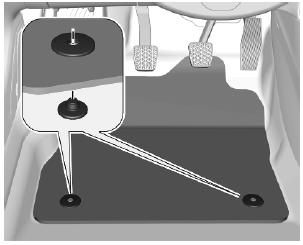
- Align slots in the mat with the retainers, as shown.
- Push the mat to the floor.
Removing
- Move the seat backwards as far as possible.
- Remove the mat.
 Interior care
Interior and upholstery
Only clean the vehicle interior,
including the instrument panel fascia
and panelling, with a dry cloth or
interior cleaner.
Clean the leather upholstery with
clear water and a soft cloth...

Other information:
Opel Corsa 2020-2026 Owners Manual: Warning label
Meaning of symbols: No sparks, naked flames or smoking. Always shield eyes. Explosive gases can cause blindness or injury. The vehicle battery contains sulphuric acid which could cause blindness or serious burn injuries. Keep the vehicle battery out of reach of children. See the Owner's Manual for further information. Explosive gas may be present in the vicinity of the vehic..
Opel Corsa 2020-2026 Owners Manual: Windscreen wiper and washer
Windscreen wiper with adjustable wiper interval HI : fast LO : slow INT : interval wiping OFF : off For a single wipe when the windscreen wiper is off, press the lever down to position 1x. Do not use if the windscreen is frozen. Switch off in car washes. To activate interval wiping mode the next time ignition is switched on, press the lever downwards to position OFF and back to INT. Adjustab..
Categories
- Manuals Home
- 6th Generation Corsa Owners Manual
- 6th Generation Corsa Service Manual
- Anti-theft alarm system
- Power outlets
- Trip / fuel information menu
- New on site
- Most important about car

Copyright © 2026 www.opcorsaf.com