
Opel Corsa: Rear view camera / Functionality
Opel Corsa 2020-2026 Owners Manual / Driving and operating / System limitations / Rear view camera / Functionality
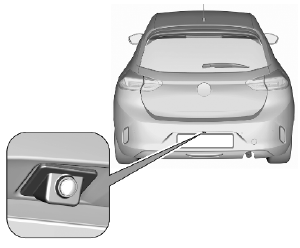
The camera is mounted in the rear bumper above the number plate.
The area displayed by the camera is limited. The distance of the image that appears on the display differs from the actual distance.
Guidelines
The first horizontal line represents a distance of about 30 cm beyond the edge of vehicle's rear bumper. The upper horizontal lines represent distances of about 1 m and 2 m.
Trajectory lane of the vehicle is shown in accordance with the steering angle.
 Switching on
R..
 Switching off
The camera is switched off when:
towing an electrically connected
trailer, bicycle carrier, etc.
a certain forward speed is
exceeded or if reverse gear is not
engaged for 7 seconds
by pressing the icon in the
left
upper corner of the touch screen
..
Other information:
Opel Corsa 2020-2026 Owners Manual: Interior mirrors
To adjust the mirror, move the mirror housing in the desired direction. Manual anti-dazzle To reduce dazzle, adjust the lever on the underside of the mirror housing. Automatic anti-dazzle Dazzle from following vehicles is automatically reduced, when driving in the dark...
Opel Corsa 2020-2026 Owners Manual: Interior care
Interior and upholstery Only clean the vehicle interior, including the instrument panel fascia and panelling, with a dry cloth or interior cleaner. Clean the leather upholstery with clear water and a soft cloth. In case of heavy soiling, use leather care. The instrument cluster and the displays should only be cleaned using a soft damp cloth. If necessary use a weak soap solution. Clean fab..
Categories
- Manuals Home
- 6th Generation Corsa Owners Manual
- 6th Generation Corsa Service Manual
- Power button
- Operation with the key in case of a central locking system fault
- Software update
- New on site
- Most important about car

Copyright © 2026 www.opcorsaf.com