
Opel Corsa: In brief
Opel Corsa 2020-2026 Owners Manual / In brief
Initial drive information
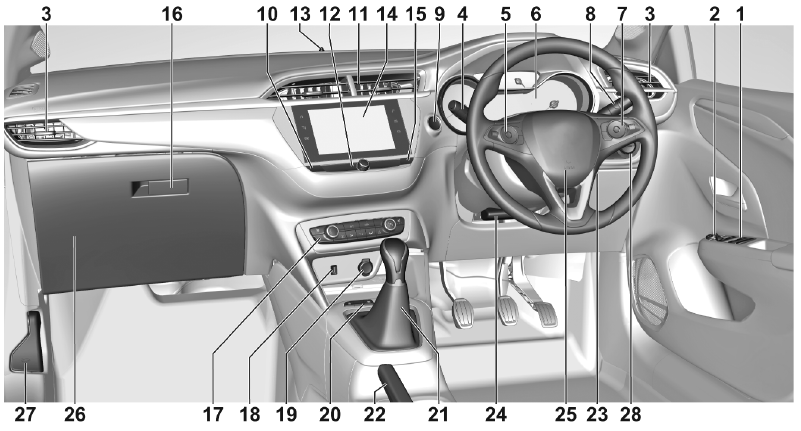
Instrument panel overview
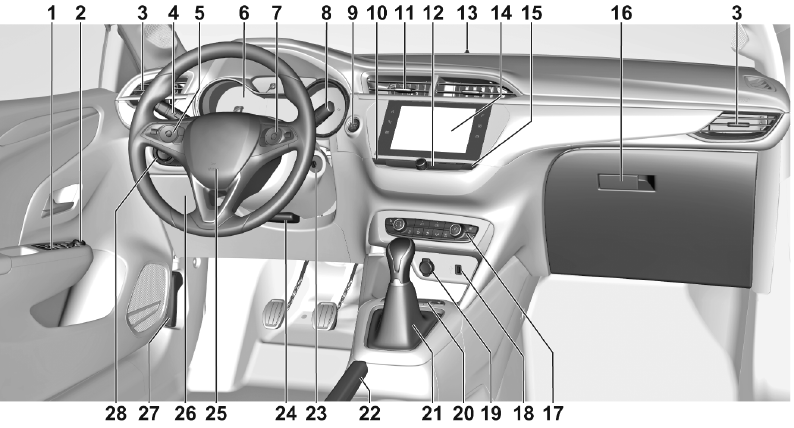
- Power windows
- Exterior mirrors
- Side air vents
- Turn lights, headlight flash, low / high beam
Parking lights
Buttons for Driver Information Centre
- Cruise control
Adaptive cruise control
Speed limiter
Heated steering wheel
- Instruments
Driver Information Centre
- Infotainment controls
- Windscreen wiper and washer, rear wiper and washer
- Power button
- Central locking system
- Centre air vents
- Controls for Info Display operation
- Anti-theft alarm system status LED
- Info Display
- Hazard warning flashers
- Glovebox
- Climate control system
- USB charging port
- Power outlet
- Parking assist / Advanced parking assist
Lane keep assist
Stop start system
Electronic Stability Control and Traction Control
- Manual transmission
Automatic transmission
- Manual parking brake
Electric parking brake
- Ignition switch
- Steering wheel adjustment
- Horn
- Fuse box
- Bonnet release lever
- Light switch
Headlight range adjustment
Front / rear fog lights
Instrument illumination
 Introduction
Vehicle specific data
Please enter your vehicle's data on
the previous page to keep it easily
accessible.
Please refer to the sections "Service
and maintenance", "Technical data",
the vehicle’s identification plate and
national registration documents...

Other information:
Opel Corsa 2020-2026 Owners Manual: System limitations
The rear view camera may not operate properly when: the surrounding is dark the beam of headlights is shining directly into the camera lenses weather limits visibility, such as fog, rain, or snow the camera lenses are blocked by snow, ice, slush, mud, dirt.Clean the lense, rinse with water, and wipe with a soft cloth the vehicle is towing an electrically connected trailer, bicycle ..
Opel Corsa 2020-2026 Owners Manual: Entry into a perpendicular parking slot
Activation Slow down the vehicle speed below 30 km/h. To search for a parking slot, activate the system in the Info Display. Select the perpendicular parking slot menu. Select parking side by switching on the turn light on the respective side. The allowed parallel distance between the vehicle and a row of parked cars is between 0.5 m and 1.5 m. When several successive slots are found, the ..
Categories
- Manuals Home
- 6th Generation Corsa Owners Manual
- 6th Generation Corsa Service Manual
- Manual transmission
- Air conditioning system
- Warning lights, gauges and indicators
- New on site
- Most important about car

Copyright © 2026 www.opcorsaf.com