
Opel Corsa: Driver Information Centre / Trip / fuel information menu
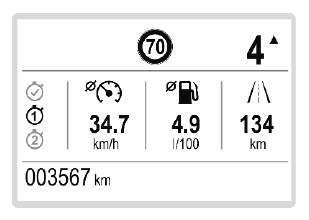
Differerent pages with combined information can be selected.
Turn the adjuster wheel to select a page.
Information page:
Fuel range
Range is calculated from current fuel level and current consumption. The display shows average values.
After refuelling, the range is updated automatically after a brief delay.
When the fuel level is low, a message
appears on the display and the
control indicator  in the fuel gauge
illuminates.
in the fuel gauge
illuminates.
Instantaneous Fuel Consumption
Display of the instantaneous consumption.
Trip 1 page:
Average speed
Display of average speed. The measurement can be reset at any time.
Average fuel consumption
Display of average consumption. The measurement can be reset at any time and starts with a default value.
Distance travelled
Displays the current distance for trip 1 since the reset.
The values of trip 1 page can be reset by pressing SET / CLR for a few seconds.
Trip 2 page:
Average speed
Display of average speed. The measurement can be reset at any time.
Average fuel consumption
Display of average consumption. The measurement can be reset at any time and starts with a default value.
Distance travelled
Displays the current distance for trip 2 since a certain reset.
The values of trip 2 page can be reset by pressing SET / CLR for a few seconds.
Digital speed page
Digital display of the instantaneous speed.
Autostop time counter
A time counter calculates the time spent in Autostop during a journey. It resets to zero every time the ignition is switched on.
Compass page
Displays the geographic direction of driving.
Blank page
No trip / fuel information is displayed.
 Selecting menus and functions
The menus and functions can be
selected via the buttons on the
indicator lever.
Turn the adjuster wheel to select a
page in the trip / fuel information
menu...
 Info Display
The Info Display is located in the
instrument panel near the instrument
cluster.
The Info Display can indicate:
time
outside temperature
date
Infotainment system, see
description in the Infotainment
Manual
indication of rear view camera
indication of panoramic view
system
navigation, see description in the
Infotainment Manual
vehicle and system messages
settings for vehicle
p..
Other information:
Opel Corsa 2020-2026 Owners Manual: System limitations
Forward collision alert is designed to warn on vehicles, but may react also to other objects. In the following cases, forward collision alert may not detect a vehicle ahead or sensor performance is limited: driving on winding or hilly roads driving during nighttime weather limits visibility, such as fog, rain, or snow the sensor in the windscreen or the radar unit behind the front ..
Opel Corsa 2020-2026 Owners Manual: Turn lights
up : right turn lights down : left turn lights A resistance point can be felt when moving the indicator lever. Constant flashing is activated when the indicator lever is being moved beyond the resistance point. It is deactivated when the steering wheel is moved in the opposite direction or indicator lever is manually moved back to its neutral position. Activate temporary flashing by holdi..
Categories
- Manuals Home
- 6th Generation Corsa Owners Manual
- 6th Generation Corsa Service Manual
- Power outlets
- Manual transmission
- Trip / fuel information menu
- New on site
- Most important about car
