
Opel Corsa: System limitations / Panoramic view system
Opel Corsa 2020-2026 Owners Manual / Driving and operating / System limitations / Panoramic view system
This system allows views of the vehicle's surroundings to be displayed as a nearly 180° picture in the Info Display, like a bird's eye view.
The system uses:
- rear camera, installed in the rear bumper
- ultrasonic parking sensors in the rear bumper
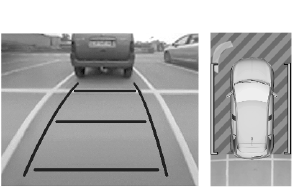
The screen in the Info display is divided into two parts. On the right there is a view from above the vehicle, and on the left there is the view from the rear displayed. The parking sensors complete the information on the view from above the vehicle.
 Functionality
When steering towards the detected
vehicle is attemped, the driver will
then notice a turning movement of the
steering wheel towards the opposite
side...
 Activation
The panoramic view system is
activated by:
engaging reverse gear
driving up to 13 km/h
..
Other information:
Opel Corsa 2020-2026 Owners Manual: Front pedestrian protection
Front pedestrian protection may help to avoid or reduce the harm caused by front-end crashes with pedestrians when driving forward. The system uses the front camera in the windscreen and depending on the vehicle configuration a radar unit in the front bumper to detect a pedestrian directly ahead in the path. Warning The usage of a license plate support may have an impact on the proper op..
Opel Corsa 2020-2026 Owners Manual: Side blind spot alert
Side blind zone alert assist helps to avoid crashes due to unintentional lane departures when an object is detected within a specified blind spot zone. The system displays a visual alert in each exterior mirror, when detecting objects that may not be visible in the interior and exterior mirrors. Side blind spot alert uses some of the advanced parking assist sensors which are located in th..
Categories
- Manuals Home
- 6th Generation Corsa Owners Manual
- 6th Generation Corsa Service Manual
- Overrun cut-off. Stop-start system
- Air conditioning system
- Trip / fuel information menu
- New on site
- Most important about car

Copyright © 2026 www.opcorsaf.com