
Opel Corsa: Keys, locks / Radio remote control
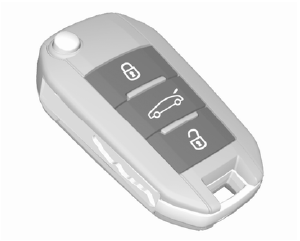
Enables operation of the following functions via the use of the remote control buttons:
- central locking system
- anti-theft locking system
- anti-theft alarm system
- tailgate unlocking and opening
- power windows
- mirrors folding
- vehicle locator lighting
- peripheral lighting
The remote control has a range of up to 100 m, but may also be much less due to external influences. The hazard warning flashers confirm operation.
Handle with care, protect from moisture and high temperatures and avoid unnecessary operation.
Replacing battery in radio remote control
Replace the battery as soon as the system no longer operates properly or the range is reduced.
In the event of a discharged battery,
 illuminates in the instrument
cluster and a warning message is
displayed in the Driver Information
Centre.
illuminates in the instrument
cluster and a warning message is
displayed in the Driver Information
Centre.

Batteries do not belong in household waste. They must be disposed of at an appropriate recycling collection point.
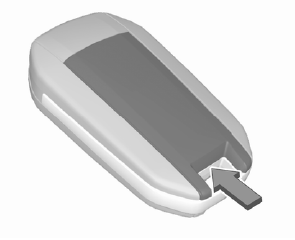
- Remove the back cover from the remote control.
- Extract the flat battery from its location.
- Replace battery with a battery of the same type. Pay attention to the installation position.
- Clip the back cover in place.
Fault
If the central locking system cannot be operated with the radio remote control, the cause may be one of the following:
- Fault in radio remote control.
- The battery voltage is too low.
- Overload of the central locking system by operating at frequent intervals, the power supply is interrupted for a short time.
- Interference from higher-power radio waves from other sources.
 Keys
Keys
Caution
Do not attach heavy or bulky items
to the ignition key.
Replacement keys
The key number is specified on a
detachable tag.
The key number must be quoted
when ordering replacement keys as it
is a component of the immobiliser
system...
 Electronic key system
Enables, depending on version, a
keyless operation of the following
functions:
central locking system
ignition switching on and starting
the engine
The electronic key simply needs to be
on the driver's person...
Other information:
Opel Corsa 2020-2026 Owners Manual: Rear parking assist
The system warns the driver with acoustic signals and display indication against potentially hazardous obstacles behind the vehicle while reverse gear is engaged. The system operates with ultrasonic parking sensors in the rear bumper. Activation The system is ready to operate when the LED in the parking assist button is not illuminated...
Opel Corsa 2020-2026 Owners Manual: High beam / daytime running light (2)
Remove the protective cover by pulling. Rotate the bulb socket anticlockwise to disengage and withdraw from the reflector. Insert the new bulb socket into the reflector housing. Fit the protective cover on. ..
Categories
- Manuals Home
- 6th Generation Corsa Owners Manual
- 6th Generation Corsa Service Manual
- Operation with the key in case of a central locking system fault
- Child locks
- Manual transmission
- New on site
- Most important about car
