
Opel Corsa: Electronic key system / Electronic key system operation. Smart access
Electronic key system operation
This system allows automatic vehicle locking and unlocking simply by detection of the electronic key. The electronic key must be outside the vehicle.
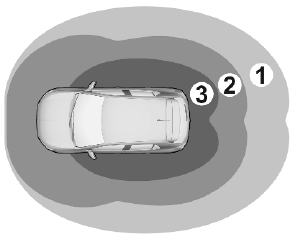
- Zone 1: switching on entry lighting
- Zone 2: automatic locking on leaving the vehicle
- Zone 3: automatic unlocking on approaching the vehicle
Note
A short time after automatic unlocking, the vehicle is relocked if no door has been opened.
If the ignition is switched off for more than nine days or the vehicle battery has no sufficient charging, the automatic function is disabled. Pass a hand behind the door handle of the driver's door to unlock the vehicle or press the tailgate button.
Unlocking
Unlocking mode can be set in the vehicle personalisation menu in the Info Display. Two settings are selectable:
- Only the driver's door and fuel filler flap will be unlocked.
- All doors, load compartment and fuel filler flap will be unlocked.
Operation with buttons on the electronic key
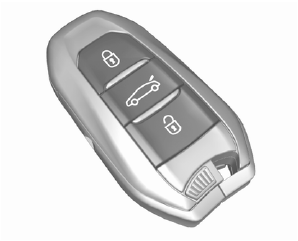
The central locking system can also be operated with the buttons on the electronic key.
Press  to unlock.
Press  to lock.
Press  to unlock only the
tailgate.
to unlock only the
tailgate.
Confirmation
Operation of central locking system is confirmed by the hazard warning flashers. A precondition is that the setting is activated in the vehicle personalisation.
Smart access
With that function a smart phone can be used as an electronic key. The vehicle is controlled via an application.
When approaching the vehicle confirm the message on the smart phone to open the vehicle.
 Remote control operation
Unlocking
Press .
Note
A short time after unlocking with the
remote control the doors are locked
automatically if no door has been
opened. A precondition is that the
setting is activated in the vehicle
personalisation...
 Central locking button
Locks or unlocks all doors, the load
compartment and fuel filler flap from
inside the passenger compartment.
Press to lock. The LED in the
button illuminates...
Other information:
Opel Corsa 2020-2026 Owners Manual: Info Display
The Info Display is located in the instrument panel near the instrument cluster. The Info Display can indicate: time outside temperature date Infotainment system, see description in the Infotainment Manual indication of rear view camera indication of panoramic view system navigation, see description in the Infotainment Manual vehicle and system messages settings for vehicle p..
Opel Corsa 2020-2026 Owners Manual: High beam. High beam assist
High beam Push to switch from low to high beam. Push again to deactivate high beam. High beam assist This feature activates the high beam when driving in dark surroundings and the vehicle speed is faster than 45 km/h. The camera in the windscreen detects the lights of oncoming or preceding vehicles. Each LED on right or left side can be triggered or faded out particularly according to the ..
Categories
- Manuals Home
- 6th Generation Corsa Owners Manual
- 6th Generation Corsa Service Manual
- Manual transmission
- Anti-theft alarm system
- Air conditioning system
- New on site
- Most important about car
