
Opel Corsa: Speed limiter / Switching on the system
Opel Corsa 2020-2026 Owners Manual / Driving and operating / Driver assistance systems / Speed limiter / Switching on the system
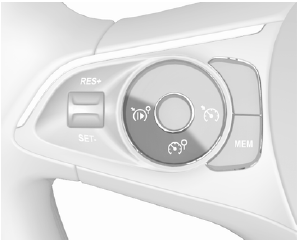
Press  .
.
 and a message are displayed in
the Driver Information Centre. The
system is still not active.
and a message are displayed in
the Driver Information Centre. The
system is still not active.
 Speed limiter
The speed limiter prevents the
vehicle from exceeding a preset
maximum speed.
The maximum speed can be set at
speeds above 30 km/h.
The driver can accelerate the vehicle
up to the preset speed...
 Activation of the functionality
Setting speed by the driver
The preset maximum speed can be
set by pressing thumb wheel to
RES/+ to increase or SET/- to
decrease the desired maximum
speed...
Other information:
Opel Corsa 2020-2026 Owners Manual: Fuel for diesel engines
The Diesel engines are compatible with bio-fuels that conform to current and future European standards and and can be obtained from filling stations: Diesel fuel that meets standard EN590 mixed with a biofuel that meets standard EN14214 (possibly containing up to 7% Fatty Acid Methyl Ester)...
Opel Corsa 2020-2026 Owners Manual: High beam / daytime running light (2)
Remove the protective cover by pulling. Rotate the bulb socket anticlockwise to disengage and withdraw from the reflector. Insert the new bulb socket into the reflector housing. Fit the protective cover on. ..
Categories
- Manuals Home
- 6th Generation Corsa Owners Manual
- 6th Generation Corsa Service Manual
- Activation
- Jump starting
- Anti-theft alarm system
- New on site
- Most important about car

Copyright © 2026 www.opcorsaf.com